Zum Inhalt springen
View in the app

A better way to browse. Learn more.

#T/N/X/T

A full-screen app on your home screen with push notifications, badges and more.

To install this app on iOS and iPadOS
  1. Tap the Share icon in Safari
  2. Scroll the menu and tap Add to Home Screen.
  3. Tap Add in the top-right corner.
To install this app on Android
  1. Tap the 3-dot menu (⋮) in the top-right corner of the browser.
  2. Tap Add to Home screen or Install app.
  3. Confirm by tapping Install.

RoboMiner II 2.14 - 1.Tag

(0 Bewertungen)

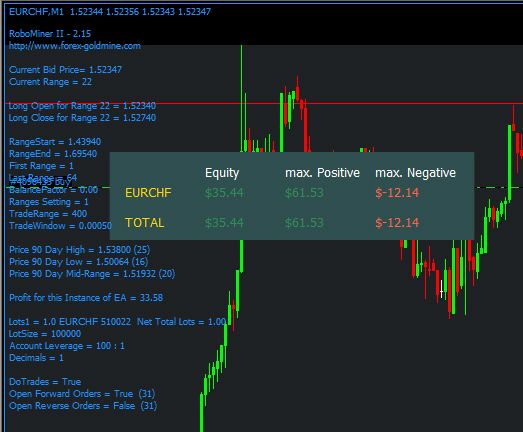
1. Trade von heute: [DEMO von FXCM]

RoboMiner_II_23_07_2009_1_Trade.jpg


Jetzt aktuell [20:00 Uhr] läuft der 2. Trade. Sehr gut kann ich hier für die Analyse ohne SL das Tool von unserem User FinGeR nutzen. :mosking:

RoboMiner_II_23_07_2009.jpg


Dieser EA handelt z.Z. nur 2 Paare:

AUDNZD Range heute: ~ 78 Pip's Spread: 20.0 Alpari, UK

EURCHF Range heute: ~ 94 Pip's Spread: 5.0 Alpari, UK


Bei diesen Paaren ist die tägliche 'Range' nicht so hoch, deshalb wurde wohl auf auf ein SL verzichtet.


EURCHF: Sonderfälle 12.03.2009 +585 Pip's + 24.06.2009 +368 Pip's !


Was war da nur los?


... und hier noch $-Marketing.


linked.gif :hrhrhr:

0 Kommentare

Empfohlene Kommentare

Keine Kommentare vorhanden

Gast
Kommentar schreiben...

Account

Navigation

Suche

Suche

Configure browser push notifications

Chrome (Android)
  1. Tap the lock icon next to the address bar.
  2. Tap Permissions → Notifications.
  3. Adjust your preference.
Chrome (Desktop)
  1. Click the padlock icon in the address bar.
  2. Select Site settings.
  3. Find Notifications and adjust your preference.