Zum Inhalt springen
View in the app

A better way to browse. Learn more.

#T/N/X/T

A full-screen app on your home screen with push notifications, badges and more.

To install this app on iOS and iPadOS
  1. Tap the Share icon in Safari
  2. Scroll the menu and tap Add to Home Screen.
  3. Tap Add in the top-right corner.
To install this app on Android
  1. Tap the 3-dot menu (⋮) in the top-right corner of the browser.
  2. Tap Add to Home screen or Install app.
  3. Confirm by tapping Install.

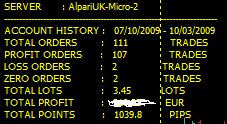
+ 1.039,8 Pip's # Live-Account seit 10.07.2009

(0 Bewertungen)

1039_8Pips.jpg :full:


Das Script dazu ist von 'haba' :mosking:


PS: Das 'durchstreichen' der €-Summe hätte ich mir sparen können, kann ja mit den vorhandenen 'Werten' nachvollzogen werden... :hrhrhr:


Heute war bei Alpari UK für die Micro's ein update [build 225]
alpari_uk.jpg

5 Kommentare

Empfohlene Kommentare

Ecart

*_skilled

Geschrieben

Danke.


Werde heute den EA in 5 unterschiedlichen Instanzen [diverse TP-Varianten] starten (je 0.01 Lot).

nostrade7895

Silent Reader

Geschrieben

sorry, für die Frage.

manuell gehandelt oder mit dem WSS ?

Ecart

*_skilled

Geschrieben

@nostrade7895


~ 90 % manuell

~ 10 % EA WSS; dieser hat den höchsten Anteil am + € Gewinn


Werde jetzt fast nur noch mit EA's traden. (schont die Nerven)

Gast
Kommentar schreiben...

Account

Navigation

Suche

Suche

Configure browser push notifications

Chrome (Android)
  1. Tap the lock icon next to the address bar.
  2. Tap Permissions → Notifications.
  3. Adjust your preference.
Chrome (Desktop)
  1. Click the padlock icon in the address bar.
  2. Select Site settings.
  3. Find Notifications and adjust your preference.