Zum Inhalt springen
View in the app

A better way to browse. Learn more.

#T/N/X/T

A full-screen app on your home screen with push notifications, badges and more.

To install this app on iOS and iPadOS
  1. Tap the Share icon in Safari
  2. Scroll the menu and tap Add to Home Screen.
  3. Tap Add in the top-right corner.
To install this app on Android
  1. Tap the 3-dot menu (⋮) in the top-right corner of the browser.
  2. Tap Add to Home screen or Install app.
  3. Confirm by tapping Install.

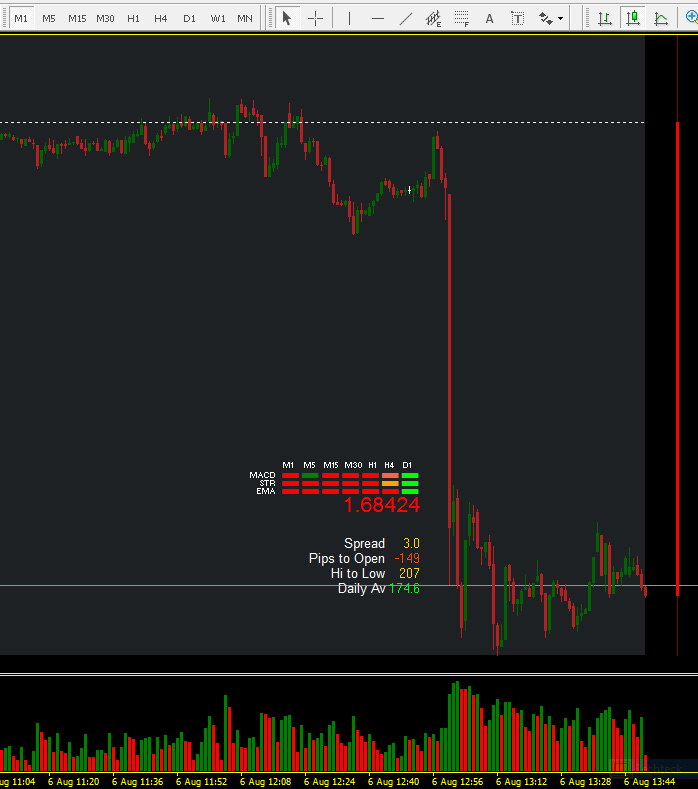
Genau 13:00 Uhr - GBPUSD minus 122,3 Pip's

(0 Bewertungen)

Wann f?llt das Dax All-Time High 21 Benutzer abgestimmt

  1. 1.

    • Juli
      28%
      2
    • August
      0%
      0
    • September
      14%
      1
    • Oktober
      14%
      1
    • November
      0%
      0
    • Dezember
      14%
      1
    • nicht in 2007
      28%
      2

Bitte melde Dich an oder registriere Dich, um an dieser Umfrage teilzunehmen.

EA WSS - Trade

09:18 / buy / 1.69900 / 13:00 1.69468 - 43,2 Pip's :mosking:


aber gleichzeitig


13:00 / sell / 1.69468 / 13:00 Uhr !!! 1.68500


+ 96,8 Pip's genau in dieser Minute :full:


GPBPUSD_06_08_2009__13_00_Uhr.jpg


BoE-Anleihenaufkaufprogramm bringt GBP unter Druck

06.08.09 13:14

Das britische Pfund hat deutlich nachgegeben, nachdem die Bank of England ihren Leitzins zwar wie erwartet unverändert bei 0,50% belassen hat, gleichzeitig aber ihr Anleihenaufkaufprogramm (Stichwort „Quantitative Easing“) um 50 Milliarden GBP auf nun 175 Milliarden GBP aufgestockt hat. GBP/USD fiel aus dem Bereich der 1,6975er-Marke bis bislang 1,6821 im Tief. Gegen 11:15 Uhr UTC notiert „Cable“ bei 1,6835. Auf die nächste Unterstützung trifft GBP/USD erst bei 1,6743.

1 Kommentar

Empfohlene Kommentare

Geschrieben

Nicht schlecht, also etwas mehr als 50 Pips im Plus.

Freu mich im Thread schon auf eine "Gesamtschau" :-)

Gast
Kommentar schreiben...

Account

Navigation

Suche

Suche

Configure browser push notifications

Chrome (Android)
  1. Tap the lock icon next to the address bar.
  2. Tap Permissions → Notifications.
  3. Adjust your preference.
Chrome (Desktop)
  1. Click the padlock icon in the address bar.
  2. Select Site settings.
  3. Find Notifications and adjust your preference.