

Zum Inhalt springen
View in the app

A better way to browse. Learn more.

#T/N/X/T

A full-screen app on your home screen with push notifications, badges and more.

To install this app on iOS and iPadOS
  1. Tap the Share icon in Safari
  2. Scroll the menu and tap Add to Home Screen.
  3. Tap Add in the top-right corner.
To install this app on Android
  1. Tap the 3-dot menu (⋮) in the top-right corner of the browser.
  2. Tap Add to Home screen or Install app.
  3. Confirm by tapping Install.

Di., 18.05.2010; +1,45%

(0 Bewertungen)

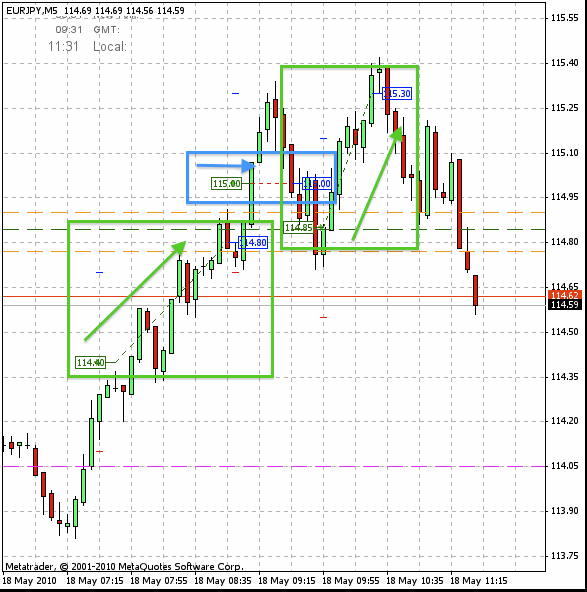
9:00 Uhr: Heute morgen bin ich im EUR/JPY long gegangen und soeben mit +40 PIPs raus. Bei 114,9 liegt ein Widerstand, den er noch nicht überwunden hat. Sollte er den knacken, bin ich nochmal long dabei mit Ziel 115,00.

9:30 Uhr: Kaum geschrieben, schon passiert. Der 2. Longtrade läuft und war schon 30 PIPs im Gewinn. Den Stopp habe ich schon mal auf Entry nachgezogen, das war hoffentlich nicht zu früh?


11:30 Uhr: Es war zu früh, ich wurde am Entry ausgestoppt, bin aber kurz später noch mal long rein mit Ziel bisheriges Tageshoch. Diesmal hat es geklappt, Target erreicht. Somit sind wieder 85 PIPs zusammen gekommen, ich beende mit 1,45% mehr auf dem Konto.
18.05.2010_eurjpy.gif

Bildschirmfoto_2010_05_18_um_11.35.56.jpg

0 Kommentare

Empfohlene Kommentare

Keine Kommentare vorhanden

Gast
Kommentar schreiben...

Account

Navigation

Suche

Suche

Configure browser push notifications

Chrome (Android)
  1. Tap the lock icon next to the address bar.
  2. Tap Permissions → Notifications.
  3. Adjust your preference.
Chrome (Desktop)
  1. Click the padlock icon in the address bar.
  2. Select Site settings.
  3. Find Notifications and adjust your preference.