

Zum Inhalt springen
View in the app

A better way to browse. Learn more.

#T/N/X/T

A full-screen app on your home screen with push notifications, badges and more.

To install this app on iOS and iPadOS
  1. Tap the Share icon in Safari
  2. Scroll the menu and tap Add to Home Screen.
  3. Tap Add in the top-right corner.
To install this app on Android
  1. Tap the 3-dot menu (⋮) in the top-right corner of the browser.
  2. Tap Add to Home screen or Install app.
  3. Confirm by tapping Install.

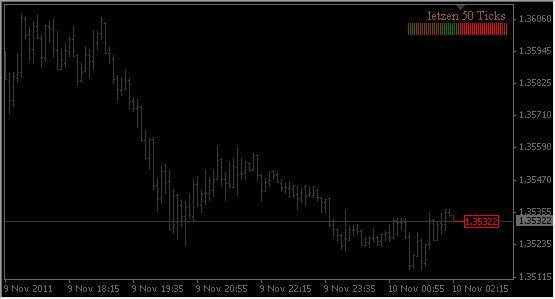
i_Tick_Vola 1.01

1 Screenshot

Indikator zeigt farblich 50 letzten Ticks als Histogramm. So könnte man besser die aktuelle Verteilung der Ticks der aktuellen Bewegung darstellen.


Im Anhang auch ein kleines Video wie es auf dem Chart aussehen könnte.

Edit: konnte leider kein Video einfügen, werde es versuchen im Support-Topic hochzuladen

Was gibt es neues in der Version 1.01

Veröffentlicht

  • Nach Entfernen des Indikators aus dem Chartfenster werden grafische Objekte nun ordnungsgemäss entfernt

Benutzer-Feedback

Empfohlene Kommentare

FinGeR

Developer

Geschrieben

Tolle Idee und Umsetzung. Danke.

Ecart

*_skilled

Geschrieben

Klasse ...:10points: ...vielen Dank. Werde es nutzen...:good2:

Dein Kommentar

Du kannst jetzt schreiben und Dich später registrieren. Wenn Du ein Konto hast, melde Dich jetzt an, um unter Deinem Benutzernamen zu schreiben.

Gast
Kommentar schreiben...

Account

Navigation

Suche

Suche

Configure browser push notifications

Chrome (Android)
  1. Tap the lock icon next to the address bar.
  2. Tap Permissions → Notifications.
  3. Adjust your preference.
Chrome (Desktop)
  1. Click the padlock icon in the address bar.
  2. Select Site settings.
  3. Find Notifications and adjust your preference.