


Zum Inhalt springen
View in the app

A better way to browse. Learn more.

#T/N/X/T

A full-screen app on your home screen with push notifications, badges and more.

To install this app on iOS and iPadOS
  1. Tap the Share icon in Safari
  2. Scroll the menu and tap Add to Home Screen.
  3. Tap Add in the top-right corner.
To install this app on Android
  1. Tap the 3-dot menu (⋮) in the top-right corner of the browser.
  2. Tap Add to Home screen or Install app.
  3. Confirm by tapping Install.

DDE Server für MetaTrader 5 (MQL5)

1 Screenshot


Programmierer:
RickD e2e-fx.net

Beschreibung:
Es wäre schade dieses kleine Tool verstauben zu lassen.
Eigentlich programmiert für MetaTrader 4(MQL4), arbeitet dieses Tool mit kleinen Anpassungen auch im MetaTrader 5(MQL5)
Es handelt sich um eine MFC Applikation.(DDE server)
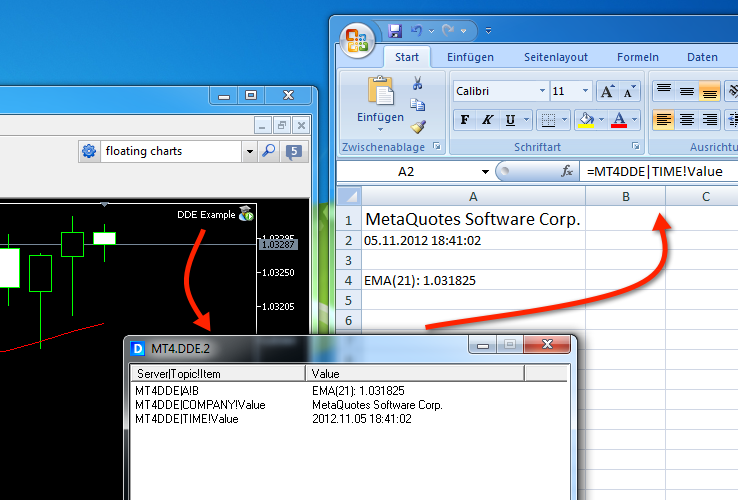
Alle Informationen die man in MQL5 abrufen & berechnen kann,
können über dieses DDE Interface exportiert werden.(z.b. aktuelle Kurs Daten zu MS Excel)

MQL5 Beispiel (Expert Advisor):
Dieses Beispiel exportiert jede Sekunde MQL5 live data .


    aktuelle MT5 Server Uhrzeit
  • current Moving Average (EMA 21)


Kommentar:
MFC Applikation. (DDE server)  Enpacken & Starten.


Benutzer-Feedback

Empfohlene Kommentare

Keine Kommentare vorhanden

Dein Kommentar

Du kannst jetzt schreiben und Dich später registrieren. Wenn Du ein Konto hast, melde Dich jetzt an, um unter Deinem Benutzernamen zu schreiben.

Gast
Kommentar schreiben...

Account

Navigation

Suche

Suche

Configure browser push notifications

Chrome (Android)
  1. Tap the lock icon next to the address bar.
  2. Tap Permissions → Notifications.
  3. Adjust your preference.
Chrome (Desktop)
  1. Click the padlock icon in the address bar.
  2. Select Site settings.
  3. Find Notifications and adjust your preference.