

Zum Inhalt springen
View in the app

A better way to browse. Learn more.

#T/N/X/T

A full-screen app on your home screen with push notifications, badges and more.

To install this app on iOS and iPadOS
  1. Tap the Share icon in Safari
  2. Scroll the menu and tap Add to Home Screen.
  3. Tap Add in the top-right corner.
To install this app on Android
  1. Tap the 3-dot menu (⋮) in the top-right corner of the browser.
  2. Tap Add to Home screen or Install app.
  3. Confirm by tapping Install.

Zufallsthema

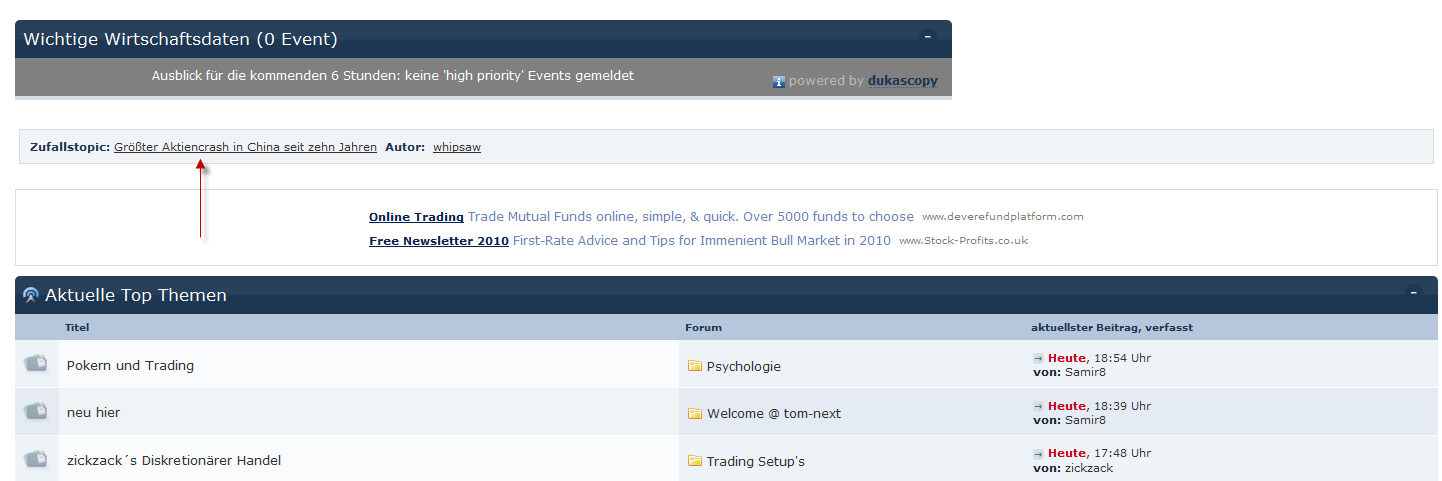
Neues Plattform Feature: Zufallsthema


Beschreibung:

Auf dem Forenindex ist eine kleine Box platziert, die mit jedem Refresh der Seite ein Topic nach dem Zufallsprinzip auswählt und den Titel des Threads in der Box anzeigt.

Wer mag kann dem Link folgen der sich hinter dem Titel verbirgt.

Copyright

© tom-next.com/community

Vom Album

IP.Board

· 1 Bild

Account

Navigation

Suche

Suche

Configure browser push notifications

Chrome (Android)
  1. Tap the lock icon next to the address bar.
  2. Tap Permissions → Notifications.
  3. Adjust your preference.
Chrome (Desktop)
  1. Click the padlock icon in the address bar.
  2. Select Site settings.
  3. Find Notifications and adjust your preference.