Zum Inhalt springen
View in the app

A better way to browse. Learn more.

#T/N/X/T

A full-screen app on your home screen with push notifications, badges and more.

To install this app on iOS and iPadOS
  1. Tap the Share icon in Safari
  2. Scroll the menu and tap Add to Home Screen.
  3. Tap Add in the top-right corner.
To install this app on Android
  1. Tap the 3-dot menu (⋮) in the top-right corner of the browser.
  2. Tap Add to Home screen or Install app.
  3. Confirm by tapping Install.

Mein aktueller EA WSS © 9.5

(0 Bewertungen)

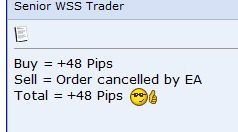
Hier mal was ich mit 'nachvollziehen' meine. Info ist von einem User aus Phnom Penh (Forum).

Dienstag, 14.07.2009 stimmt mit meinen Werten überein.

Tradebest_tigung_aus_Phnom_Penh.jpg


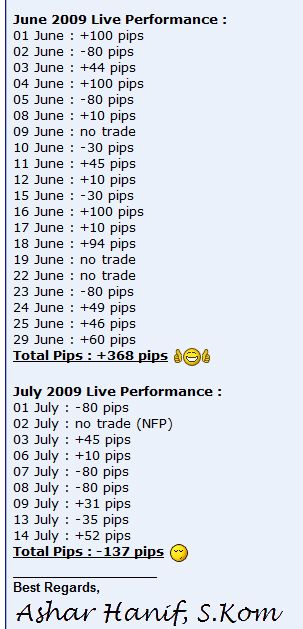
Aktuelle Übersicht vom 'Entwickler':


Total_Pips_Stand_14_07_2009.jpg

0 Kommentare

Empfohlene Kommentare

Keine Kommentare vorhanden

Gast
Kommentar schreiben...

Account

Navigation

Suche

Suche

Configure browser push notifications

Chrome (Android)
  1. Tap the lock icon next to the address bar.
  2. Tap Permissions → Notifications.
  3. Adjust your preference.
Chrome (Desktop)
  1. Click the padlock icon in the address bar.
  2. Select Site settings.
  3. Find Notifications and adjust your preference.