

Zum Inhalt springen
View in the app

A better way to browse. Learn more.

#T/N/X/T

A full-screen app on your home screen with push notifications, badges and more.

To install this app on iOS and iPadOS
  1. Tap the Share icon in Safari
  2. Scroll the menu and tap Add to Home Screen.
  3. Tap Add in the top-right corner.
To install this app on Android
  1. Tap the 3-dot menu (⋮) in the top-right corner of the browser.
  2. Tap Add to Home screen or Install app.
  3. Confirm by tapping Install.

Kursverhalten verschiedener Plattformen

(0 Bewertungen)

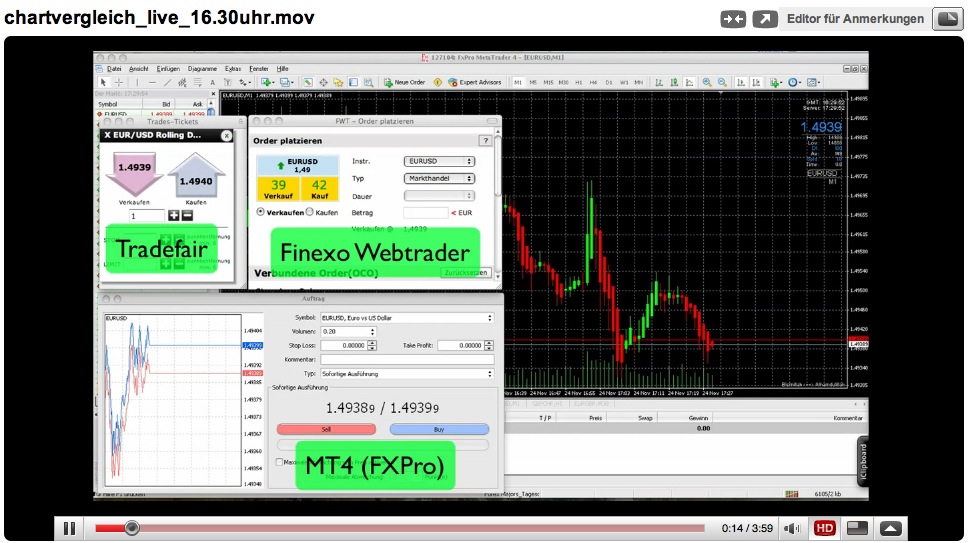
Hier eine Gegenüberstellung im Metatrader 4 (FXPro), dem Finexo-Webtrader und Tradefair Spreads Germany. Alle 3 sind Live-Konten.

Da ich den MT4 und die Tradefair-Plattform immer parallel laufen habe, konnte ich die Kurse jetzt über mehrere Tage beobachten. Dies ist nur ein kurzer Ausschnitt, eine Aufnahme vom 24.11.09 zu den News um 16.30 Uhr.
 

Bildschirmfoto_2009_11_24_um_23.05.39.jpg


Der Spread ist beim Finexo-Webtrader 2 PIPs höher, aber ansonsten sehe ich keine großen Unterschiede. Der MT4-Kurs erscheint etwas "unruhiger", aber das liegt wahrscheinlich an den 5 Digits.


In Kürze erfolgt noch ein Test zum Stopp-Fishing. Bisher konnte ich noch keins feststellen.

1 Kommentar

Empfohlene Kommentare

Geschrieben

Danke für den Link auf den Blogeintrag!

Hatte ich zuvor nicht gesehen. Sehr interessant.

Gast
Kommentar schreiben...

Account

Navigation

Suche

Suche

Configure browser push notifications

Chrome (Android)
  1. Tap the lock icon next to the address bar.
  2. Tap Permissions → Notifications.
  3. Adjust your preference.
Chrome (Desktop)
  1. Click the padlock icon in the address bar.
  2. Select Site settings.
  3. Find Notifications and adjust your preference.