bolle
Silent Reader
-
Benutzer seit
-
Letzter Besuch
Alle Inhalte von bolle
-
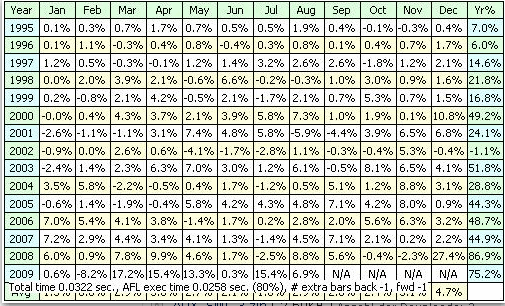
mal ne dumme Frage, wie kommt man zu dieser Peformance Matrix, ist das abhängig von der AB-Version? Grüße Bolle
-
Nachtrag! SELL=1; funktioniert :) kann mir jemand sagen was genau die 1 bewirkt?
-
Danke für eure Antworten. Der nachfolgende Code bringt leider nicht den erwarteten Exit im gleichen Bar: //Entry & Exit same Bar D3= (Ref(C,-3))<(Ref(O,-3));//downday D2= (Ref(C,-2))>(Ref(O,-2));//upday D1= (Ref(C,-1))>(Ref(O,-1));//upday SetOption( "AllowSameBarExit", True ); // Handel inerhalb eines Tages verbieten/ erlauben. Buy=D3 AND D2 AND D1;//Einstieg zum heutigen Open Sell=Close; //Exit zum heutigen Close und mit Sell=BarsSinceBuy==0; bekomme ich eine Fehlermeldung, mmhhh
-
Frage an die Amibroker Experten! ich teste derzeit ein simples Regelwerk, bin aber bei der Anzeige im Backtest auf Ungereimtheiten gestossen mein afl code sieht so aus: //Entry & Exit same Bar D3= (Ref(C,-3))<(Ref(O,-3));//downday D2= (Ref(C,-2))>(Ref(O,-2));//upday D1= (Ref(C,-1))>(Ref(O,-1));//upday Buy=D3 AND D2 AND D1; //Einstieg zum heutigen Open Sell=C; //Exit zum heutigen Close Im Backtest wird trotzdem bei einigen Trades eine Haltedauer länger als 1Tage angezeigt, was mache ich falsch? vielen Dank im voraus Bolle