Für das Erstellen der Webseite wurde ein wenig Geld in die Hand genommen, auch der Content ist ins Deusche übersetzt worden.
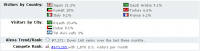
Was stört mich? Wie so oft ist es eine Tortour an Kontaktdaten heranzukommen bzw. Namen des Managements. Der Audience nach zu urteilen, kann man davon ausgehen, dass der Broker irgendwo Offshore domiziliert ist. Genau sagen lässt sich das aber erst nach weiteren Recherchen.


http://4xp.com
Just another MT4 Broker...
Für das Erstellen der Webseite wurde ein wenig Geld in die Hand genommen, auch der Content ist ins Deusche übersetzt worden.
Was stört mich?
Wie so oft ist es eine Tortour an Kontaktdaten heranzukommen bzw. Namen des Managements.
Der Audience nach zu urteilen, kann man davon ausgehen, dass der Broker irgendwo Offshore domiziliert ist.
Genau sagen lässt sich das aber erst nach weiteren Recherchen.