


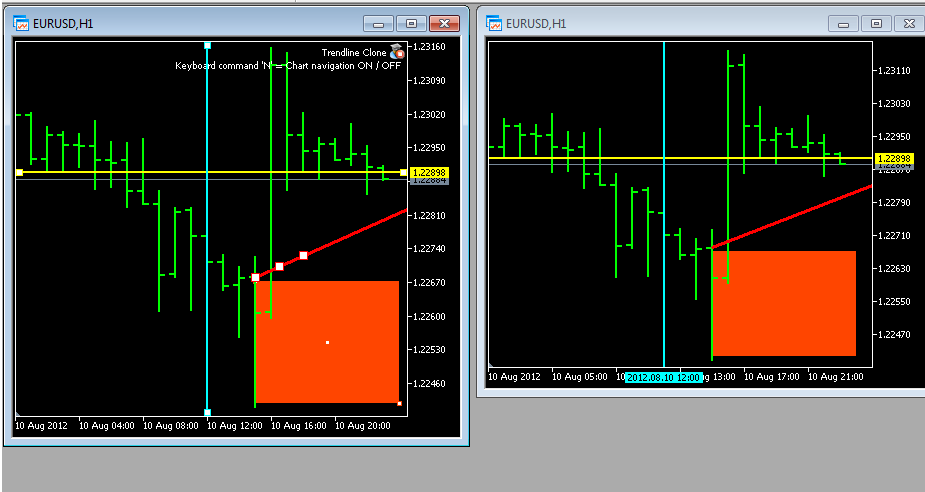
Trendline Clone Version 1.6
Dieser Expert Advisor für MetaTrader 5, erstellt auf allen offenen Charts einen Klon von jeder neu erstellten
Trend Line, Vertical Line, Horizontal Line, Rectangle & Arrowed Line.
Update Version 1.6
- Unterstützt jetzt Arrowed Line
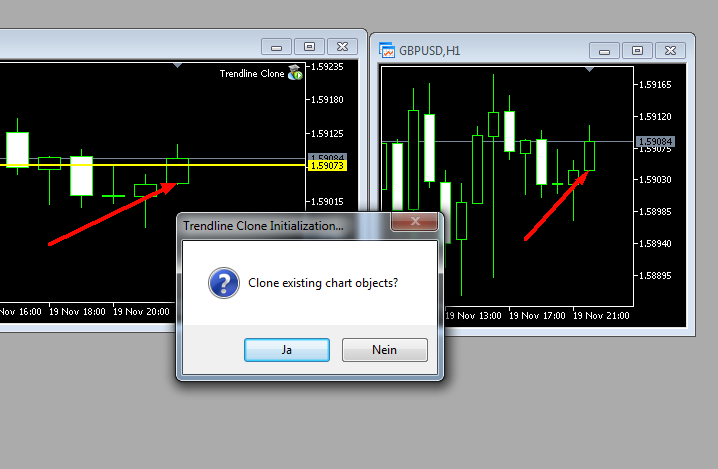
- Beim Start hat man die Wahl ob schon vorhandene Chart Objekte(Trend Line etc.) geklont werden sollen.
- Beim Beenden hat man die Wahl ob geklonte Chart Objekte(Trend Line etc.) gelöscht werden sollen.
 Durch drücken der N Taste kann man die Navigation der Charts AN/AUS schalten. (on-the-fly)
Was gibt es neues in der Version 1.6
Veröffentlicht
- Unterstützt jetzt Arrowed Line
- Beim Start hat man die Wahl ob schon vorhandene Chart Objekte(Trend Line etc.) geklont werden sollen.
- Beim Beenden hat man die Wahl ob geklonte Chart Objekte(Trend Line etc.) gelöscht werden sollen.
Empfohlene Kommentare
Dein Kommentar
Du kannst jetzt schreiben und Dich später registrieren. Wenn Du ein Konto hast, melde Dich jetzt an, um unter Deinem Benutzernamen zu schreiben.