

Zum Inhalt springen
View in the app

A better way to browse. Learn more.

#T/N/X/T

A full-screen app on your home screen with push notifications, badges and more.

To install this app on iOS and iPadOS
  1. Tap the Share icon in Safari
  2. Scroll the menu and tap Add to Home Screen.
  3. Tap Add in the top-right corner.
To install this app on Android
  1. Tap the 3-dot menu (⋮) in the top-right corner of the browser.
  2. Tap Add to Home screen or Install app.
  3. Confirm by tapping Install.

PhanTi

Rookie
  • Benutzer seit

  • Letzter Besuch

Alle Inhalte von PhanTi

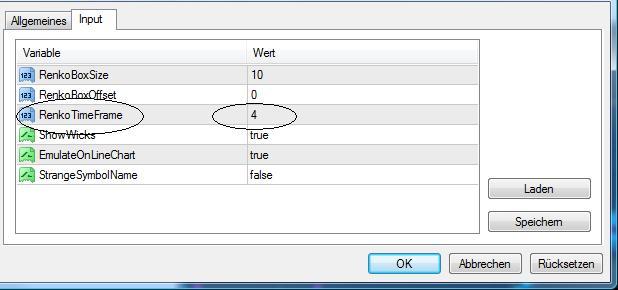
  1. Eben...deshalb war/bin ich so stutzig geworden. Siehe die option im Anhang, was bedeuted diese? Mit den besten Grüßen Jonas
  2. Hey Ihr ! Ich bin auch auf ff.com unterwegs (PhanTi) und habe angefangen mit renkos zu traden. Finde dieses Konzept hier sehr interessant. Bei guten Resultaten könnte ich mit jemandem reden der so ca. alles coden und automatisieren kann. Noch eine Frage : Welche Unterschiede bringen mir verschiedene ''renko_Timeframes'' ? Werde meine Ansätze etc. morgen posten...bin jetzt erstmal ne Runde pennen ;-) Liebe Grüße , Jonas
Account

Navigation

Suche

Suche

Configure browser push notifications

Chrome (Android)
  1. Tap the lock icon next to the address bar.
  2. Tap Permissions → Notifications.
  3. Adjust your preference.
Chrome (Desktop)
  1. Click the padlock icon in the address bar.
  2. Select Site settings.
  3. Find Notifications and adjust your preference.